
I saved a file from Excel as Unicode Txt.
I then used HeidiSql to import it to MySql.
The result showing in HeidiSql is box-letter-box-letter.
It looks fine, however, in PhpMyAdmin.
Here are 2 images showing what I see:
www.linguashop.com/heidisql/
Any help anyone could offer would be much appreciated.
David
Characters showing weird in HeidiSql but fine in PhpMyAdmin

 ansgar posted
14 years ago
ansgar posted
14 years ago

I can only guess you didn't select the right charset when importing the file in HeidiSQL? No clue. You could post your
SHOW CREATE TABLE phrases![[expired user #5003]'s profile image](http://www.gravatar.com/avatar/240ac9371ec2671ae99847c3ae2e6384?d=identicon&s=48) [expired user #5003] posted
14 years ago
[expired user #5003] posted
14 years ago
The csv file is here:
www.linguashop.com/heidisql
Show Table here:
CREATE TABLE `phrases` (
`Pindex` int(5) DEFAULT NULL,
...
...
ENGINE=MyISAM DEFAULT CHARSET=utf8
www.linguashop.com/heidisql
Show Table here:
CREATE TABLE `phrases` (
`Pindex` int(5) DEFAULT NULL,
...
...
ENGINE=MyISAM DEFAULT CHARSET=utf8
[expired user #5003] posted
14 years ago
By the way:
I downloaded HeihiSql yesterday from your site.
http://www.heidisql.com/download.php by clicking "Installer".
That means that link is 100 revisions old.
I downloaded HeihiSql yesterday from your site.
http://www.heidisql.com/download.php by clicking "Installer".
That means that link is 100 revisions old.
ansgar posted
14 years ago
Yes, the official releases often tend to get old very soon.
The file has UCS-2 Little Endian format, and I did not succeed importing that file using the ucs2 character set option:
0 rows affected, where it should have inserted 929 rows.
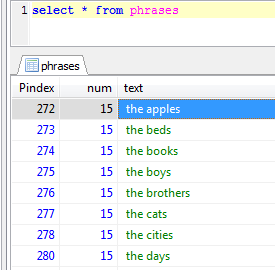
Converting the file with Notepad++ to UTF-8 did the trick, and rows look fine:
The file has UCS-2 Little Endian format, and I did not succeed importing that file using the ucs2 character set option:
LOAD DATA LOCAL INFILE 'D:\\temp\\phrases.txt' INTO TABLE `xyz`.`phrases`
CHARACTER SET ucs2
FIELDS TERMINATED BY ';' LINES TERMINATED BY '\r\n'
IGNORE 1 LINES
(`Pindex`,`num`,`text`);
0 rows affected, where it should have inserted 929 rows.
Converting the file with Notepad++ to UTF-8 did the trick, and rows look fine:
LOAD DATA LOCAL INFILE 'D:\\temp\\phrases.txt' INTO TABLE `xyz`.`phrases`
CHARACTER SET utf8
FIELDS TERMINATED BY ';' LINES TERMINATED BY '\r\n'
IGNORE 1 LINES
(`Pindex`,`num`,`text`);
1 attachment(s):
Please login to leave a reply, or register at first.
 Database powered by MariaDB
 HeidiSQL is proudly built with Embarcadero Delphi
