
How do you commit a direct field edit? I press the RETURN key but when I hit refresh, it reverts to the old value. I used to be able to arrow up or arrow down to commit the UPDATE, but those keys seem to have been disabled via Heidi.
BTW, I'm referring to a table that has only one entry in it. If I had multiple entries, the up and down arrows will commit the update.
How to commit a change

 ansgar posted
16 years ago
ansgar posted
16 years ago

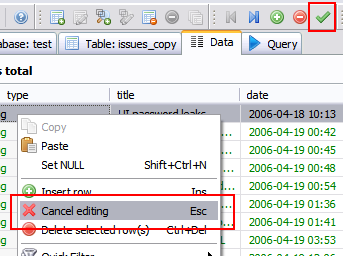
There is a green check mark at the very top toolbar, see here:
This button should also live on the context popup of the grid, while there is this "Cancel editing" menu item which also should live on the top toolbar. Will add those missing items soon.
This button should also live on the context popup of the grid, while there is this "Cancel editing" menu item which also should live on the top toolbar. Will add those missing items soon.
1 attachment(s):
 ansgar posted
16 years ago
ansgar posted
16 years ago
Any suggestions regarding a good shortcut for this "Post" button? Probably <Ctrl> <Return> ... ?
ansgar posted
16 years ago
See r1684
![[expired user #3333]'s profile image](http://www.gravatar.com/avatar/2be9bd7a3434f7038ca27d1918de58bd?d=identicon&s=100) [expired user #3333] posted
16 years ago
[expired user #3333] posted
16 years ago
CTRL+Return works for me. Thank you. :)
[expired user #3333] posted
16 years ago
...This button should also live on the context popup of the grid, while there is this "Cancel editing" menu item which also should live on the top toolbar...
I see the buttons for a VARCHAR or TEXT field, but I was referring to an INT field. There's no context popup for an INT field. The CTRL+Return works though.
![[expired user #8515]'s profile image](http://www.gravatar.com/avatar/c39e1a03859f9ee215bc49131d0caf33?d=identicon&s=100) [expired user #8515] posted
8 years ago
[expired user #8515] posted
8 years ago
This does not work when having pressed ctrl+shift+n in order to make a field NULL. One has to press a cursor key prior to ctrl+enter to post.
Please login to leave a reply, or register at first.
 Database powered by MariaDB
 HeidiSQL is proudly built with Embarcadero Delphi
